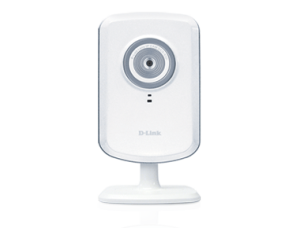
Have you ever wished you could keep an eye on your office or home when you are not actually physically there? Wanted to keep an eye on a young child’s play area while you are working in another area of your home? How about spying on your pet while you’re at the office? The DCS-930L Wireless N Network Camera allows you to do just that.
I am often away from my home taking care of business or doing things with my children, and although I live in a safe neighborhood, I still worry about what’s going on around my house when I am gone for extended periods of time. By extended periods of time, I mean for let’s say more then 5-6 hours. I don’t think I’m paranoid or anything and I tend to think that there are a lot of people out there just like me.
Recently, I was given the opportunity to try a Wireless Network Camera which would allow me to view my home when I wasn’t there. I have to say I absolutely love it!
Installation was really easy. It took about 2 minutes to have everything up and running. The product comes with everything you need to be up and running in no time. You plug your included Ethernet cable into your new camera and then into the network of your computer, attach the power supply and then run an installation cd. Can you believe it, it’s that easy to setup. If your router is already capable of handling WPS then it’s even easier. You press the WPS button on the camera, then on your router and it’ll setup itself. Wow! During installation you’ll be prompted to create a mydlink account which you’ll be able to sign into to later view your camera’s live view. So no matter where you are you can sign into your account and see what your camera is seeing, that is as long as you have a computer and an internet connection.
The camera is great for those who need to keep an eye on things while they aren’t around. College students who live in dorms can keep an eye on things while they are in the library or another part of campus. Moms can use it as a baby monitor, although checking in on their children in person should be first. There are so many ways to make use of this camera.
Here is a couple of the cameras features & benefits:
- You get mobile monitoring, you can use a laptop, Android phone or table, iPhone or iPad, all through Wi-Fi, 3G or 4G
- There is no need to leave your computers web cams on, this camera is already ready to stream live video.
- Installation is a breeze.
The camera sells for about $119.00. You can read more about the camera from the company’s website. I was really impressed on how well the camera worked, and would recommend that everyone get one. There will come a time when you might need it, and if you get one, you’ll already have it on hand.